

What you’ll build
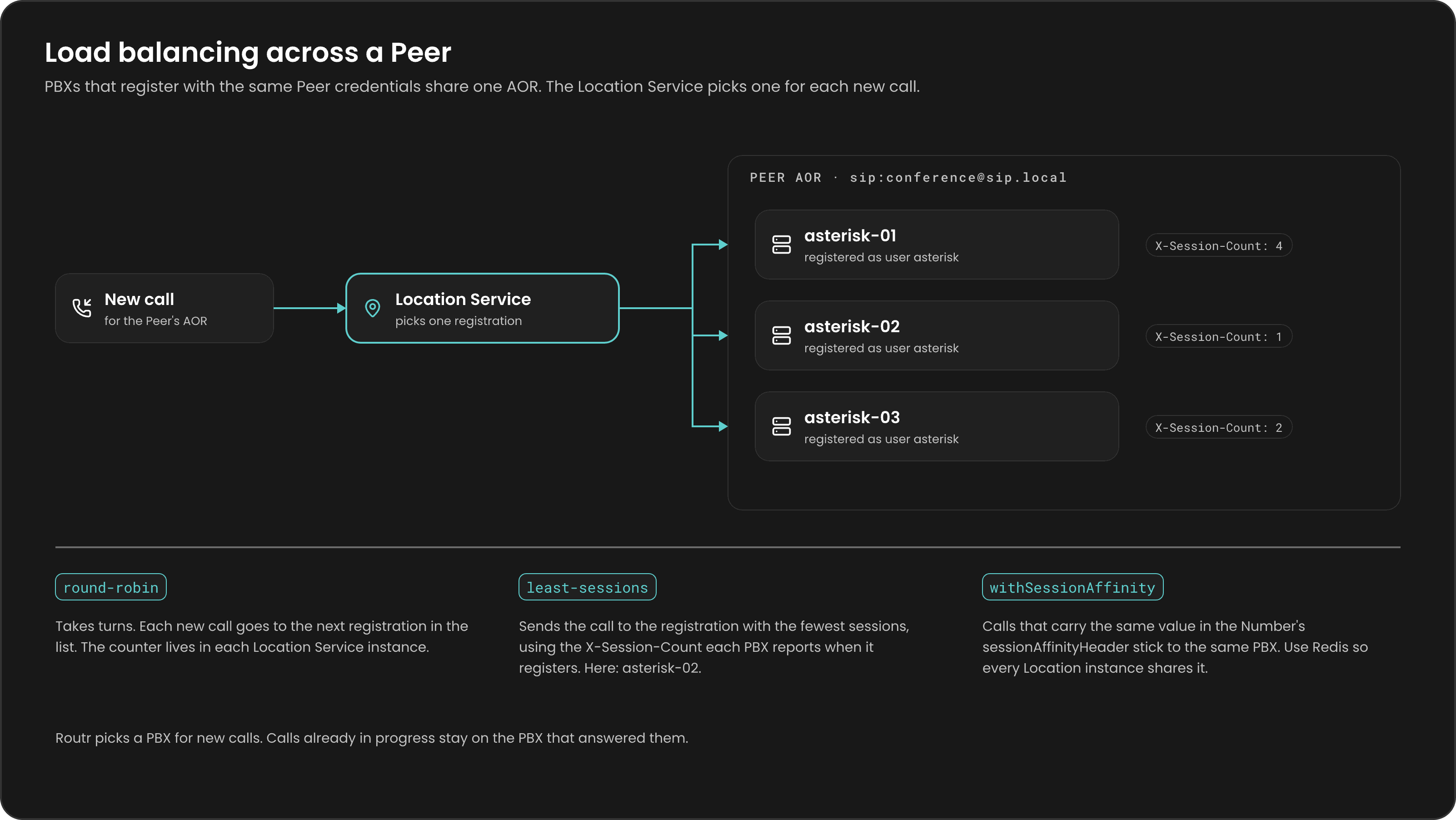
You run Routr and two Asterisk containers with Docker Compose. Both Asterisk servers register to Routr with the same credentials, so Routr groups them under one Peer and one Address of Record (AOR). When a softphone calls the Peer, the Location Service picks one of the registered Asterisk servers for each new call.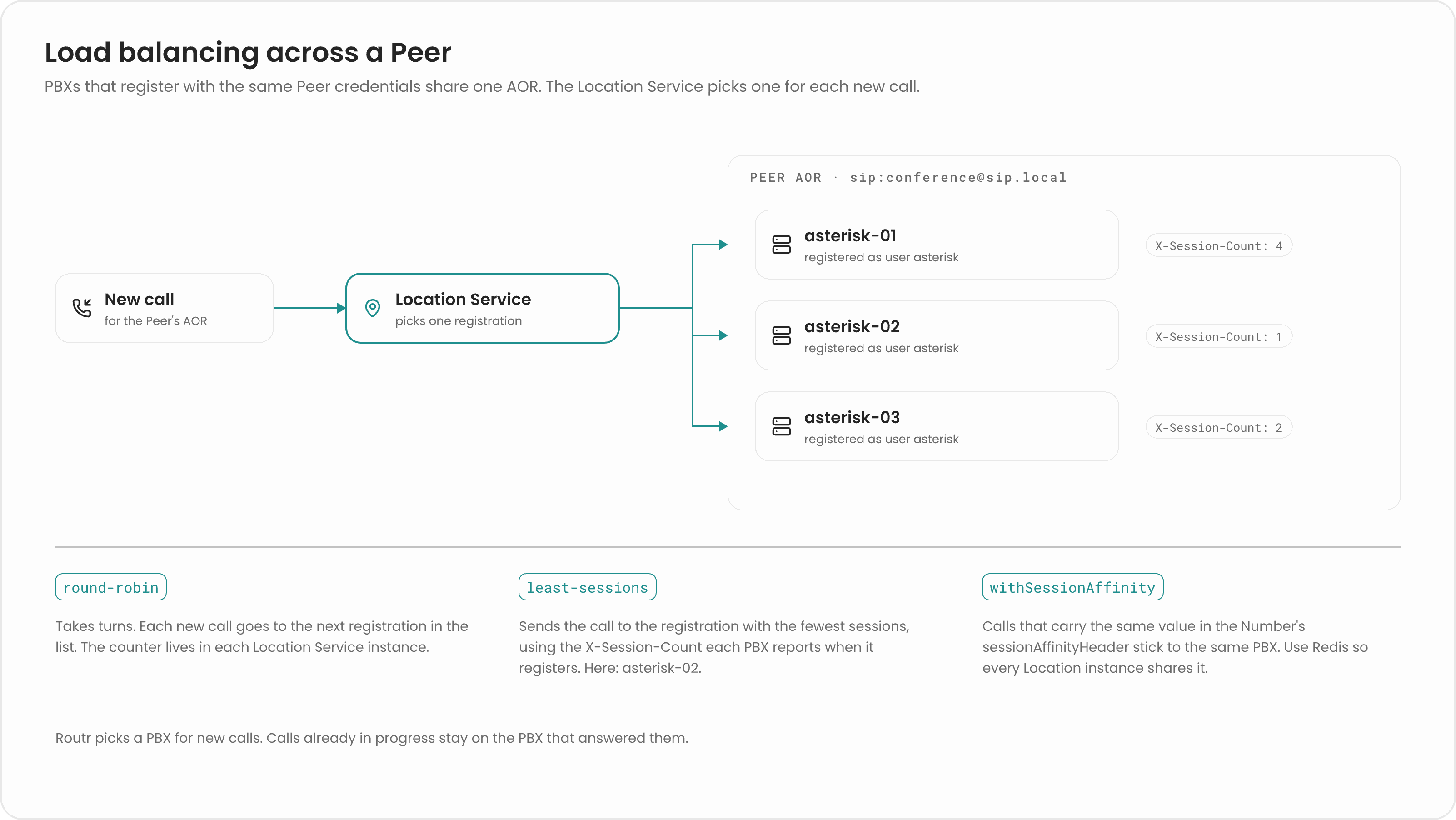
Routr balances new calls. It picks a server when a call starts, and the call stays on that server until it ends. Routr does not move in-flight calls, and it does not recover a call if the Asterisk server handling it goes away.
Prerequisites
- Docker with Docker Compose
- Node.js and npm, to install
rctl - A SIP softphone such as Zoiper or Linphone
- The IP address of your machine on your local network (for example,
192.168.1.3)
Steps
1
Create the project files
Create a folder for the tutorial and move into it.Create a dialplan for each Asterisk server. Each one answers calls to the Filename:
asterisk extension, logs its own name, and says a different digit, so you can tell them apart.Filename: extensions.01.confextensions.02.conf2
Define the services
Create a Both Asterisk services use the same
compose.yaml file. It runs routr-one (all Routr components plus an internal database), two Asterisk servers, and RTPEngine for media.Filename: compose.yamlSIPPROXY_USERNAME and SIPPROXY_SECRET. That is what makes Routr treat them as one Peer.fonoster/mediaserver is an Asterisk image that registers to the host in SIPPROXY_HOST with the given username and secret. Any Asterisk build works the same way, as long as it registers to Routr as a Peer and sends calls for the asterisk extension to a dialplan.3
Start the stack
Start the services. Replace the address with your own.Check that the containers are up.You see four services with status
Up (or running). The Asterisk servers try to register right away and fail, because the Peer doesn’t exist yet. You create it next.4
Install rctl
Install the command-line tool.The
--insecure flag in the next steps is required because this setup doesn’t use TLS on the API.5
Create a Domain and an Agent
Create the Domain your softphone registers to.Answer the prompts like this:Create credentials for the Agent, using Then create the Agent and link it to the Domain and credentials.
1001 as the username and 1234 as the password.6
Create the Asterisk Peer
Create the credentials both Asterisk servers share: username Create the Peer. Use List the Peers to confirm.
asterisk, password asterisk.asterisk as the username and sip:asterisk@sip.local as the AOR. Leave Contact Address and Max Contacts empty, so any number of servers can register under the AOR. Choose Round Robin.7
Register the Asterisk servers
Restart the Asterisk containers so they register now instead of waiting for their next retry.Each server registers from its own container address. Routr stores both contacts under
sip:asterisk@sip.local.docker compose logs routr shows no authentication errors for the asterisk user, and both Asterisk containers stay up.8
Register your softphone
Configure the softphone with these values:
sip.local isn’t a real DNS name, so the proxy setting tells the softphone where to send requests.The softphone shows the account as registered.
9
Call the Peer and watch Routr balance
In a second terminal, open From the softphone, call The output alternates between the two servers, similar to this:
sngrep inside the Routr container to watch SIP traffic.asterisk (the full URI is sip:asterisk@sip.local). Hang up and call again a few times.Routr finds the Peer by its username, looks up the routes for sip:asterisk@sip.local, and picks the next one in round-robin order. In sngrep, the INVITEs that Routr forwards alternate between the two Asterisk container addresses. You also hear “one” on one call and “two” on the next.You can also search the Asterisk logs for the message each dialplan writes:Consecutive calls land on different Asterisk servers.
10
Stop one server
Stop one Asterisk server and call again.New calls keep reaching
asterisk01 once the stopped server’s registration expires or is removed. A call that was already in progress on asterisk02 ends with it; Routr does not move it.Start the server again when you’re done.Route PSTN calls to the Peer
In production, calls usually arrive from a carrier. To send them to the same pool of Asterisk servers, link a Number to the Peer’s AOR. The Number needs a Trunk whose inbound SIP URI matches the host your carrier sends calls to.+17066041487 arrives on the Trunk, Routr finds the Peer whose AOR equals the Number’s AOR Link and applies the Peer’s balancing algorithm. See Numbers and Trunks for every field.
Choose a balancing algorithm
Turn on session affinity when related calls must reach the same server, for example everyone joining one conference room. Set
withSessionAffinity on the Peer and a sessionAffinityHeader on the Number (such as X-Room-Id). Routr sends calls with the same header value to the same server.
routr-one runs the Location Service with the in-memory cache, so use round-robin with it. For least-sessions, run Routr with Redis, for example with the Helm chart, which enables Redis by default. See Scale with Redis.FreeSWITCH works the same way. Configure a gateway in FreeSWITCH that registers to Routr with the Peer’s username and password. Every FreeSWITCH server that registers with those credentials joins the Peer’s AOR, and Routr balances new calls across them.
Clean up
Stop and remove the containers.Next steps
Load balancing
How round-robin, least-sessions, and session affinity work.
Connect a PBX as a Peer
Configure Asterisk or FreeSWITCH to register with Routr.
Scale with Redis
Share the Location Service state across instances.
Peers reference
Every Peer field, including load balancing options.