

INVITE, the Connect processor answers two questions: who is calling, and who is being called? The answer determines the routing type, and the routing type determines which access checks run and where the call goes.
How Connect identifies the caller and the callee
Connect looks up the caller from the user and host in theFrom header, and the callee from the user and host in the Request-URI. For each one, it tries these resources in order:
- A Number whose
telUrlistel:plus the user part. - An Agent with that username, but only if the Agent belongs to the Domain named by the host. An Agent from another Domain doesn’t match.
- A Peer with that username.
X-Connect-Token, Connect builds the caller from the token’s claims instead and looks up the callee as the Peer whose aor equals the token’s aorLink.
The five routing types
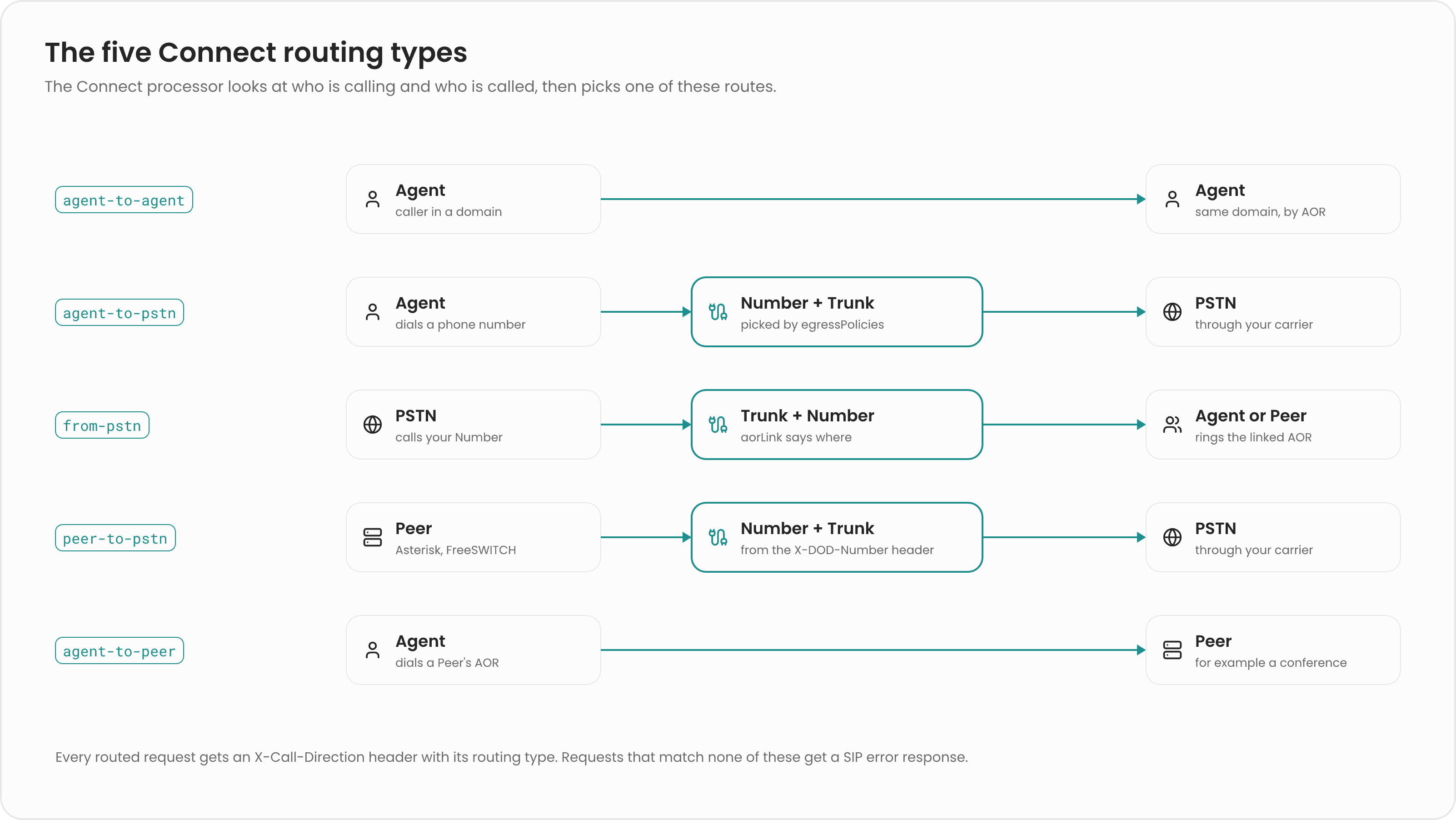
Connect picks the routing type from the kinds of the two parties:
Any other combination is rejected with
403 Forbidden.
agent-to-agent
An Agent calls another Agent in its Domain, for example1001 dialing 1002 in sip.local. Connect asks the Location Service for the callee’s registered route and sends the call there.
agent-to-pstn
An Agent dials a number that isn’t an Agent, Peer, or Number in Routr. Connect checks the caller’s Domain for an egress policy whoserule, a regular expression, matches the dialed number. The first match selects a Number, and that Number’s Trunk carries the call. Connect sets the Privacy header from the Agent’s privacy setting and adds Remote-Party-ID, P-Asserted-Identity, and the Trunk’s authentication. If no policy matches, the call fails.
from-pstn
A call arrives from a carrier for one of your Numbers. The Number’saorLink says where the call goes, for example sip:1001@sip.local for an Agent or sip:conference@sip.local for a group of Peers. If a Peer has that aor, Connect applies the Peer’s load balancing settings. Connect also adds the Number’s extraHeaders to the request.
A Number can name a sessionAffinityHeader. When the incoming call carries that header, Connect passes its value to the Location Service so that calls with the same value reach the same Peer, for example every caller joining the same conference room.
peer-to-pstn
A Peer, such as Asterisk, dials a number that Routr doesn’t know. Because a Peer isn’t bound to a Domain, it must say which Number to call from: the request must include anX-DOD-Number header with a Number you own, and may include X-DOD-Privacy. Connect uses that Number’s Trunk. Without the header, Connect answers 400 Bad Request; with an unknown Number, 404 Not Found. If the Number has an extended.accessKeyId, the request must carry a matching X-Access-Key-Id header or it’s rejected with 403 Forbidden.
agent-to-peer
An Agent calls a Peer directly. This is designed for Agents that present anX-Connect-Token whose aorLink names the Peer, such as browser clients calling a feature server. Connect applies the Peer’s load balancing settings to pick an instance.
The code also defines a
peer-to-agent type, but it isn’t supported yet.Access checks
Connect runs access checks onINVITE requests, except those authorized by an X-Connect-Token, whose signature is verified instead:
- agent-to-agent, agent-to-pstn, and peer-to-pstn: the caller must answer a digest challenge with the password from its Credentials. The first
INVITEgets401 Unauthorizedwith a challenge. - from-pstn: Connect finds the Trunk whose inbound URI matches the Request-URI host and checks that the dialed Number belongs to that Trunk. If the Trunk has an ACL, the request’s source address must match one of the ACL’s
allowentries. The source address is the topViaheader’sreceivedvalue, or its host whenreceivedis absent. If the Trunk has inbound Credentials, the carrier must also pass a digest challenge.
INVITE is enforced for Trunks.
The X-Call-Direction header
After routing, Connect adds anX-Call-Direction header to the request with the routing type as its value, for example X-Call-Direction: from-pstn. Downstream systems, such as a media server or a Middleware, can use it to decide how to treat the call.
Connect first removes any X-Call-Direction that came from an untrusted source, together with other platform headers, so a caller from the PSTN can’t spoof it. See SIP headers for the full list.
Related pages
Connect mode
See the resources behind each routing type.
Load balancing
Learn how Connect picks one Peer from a group.
Numbers
Configure
aorLink, sessionAffinityHeader, and extraHeaders.SIP headers
Look up every header Routr reads or adds.