

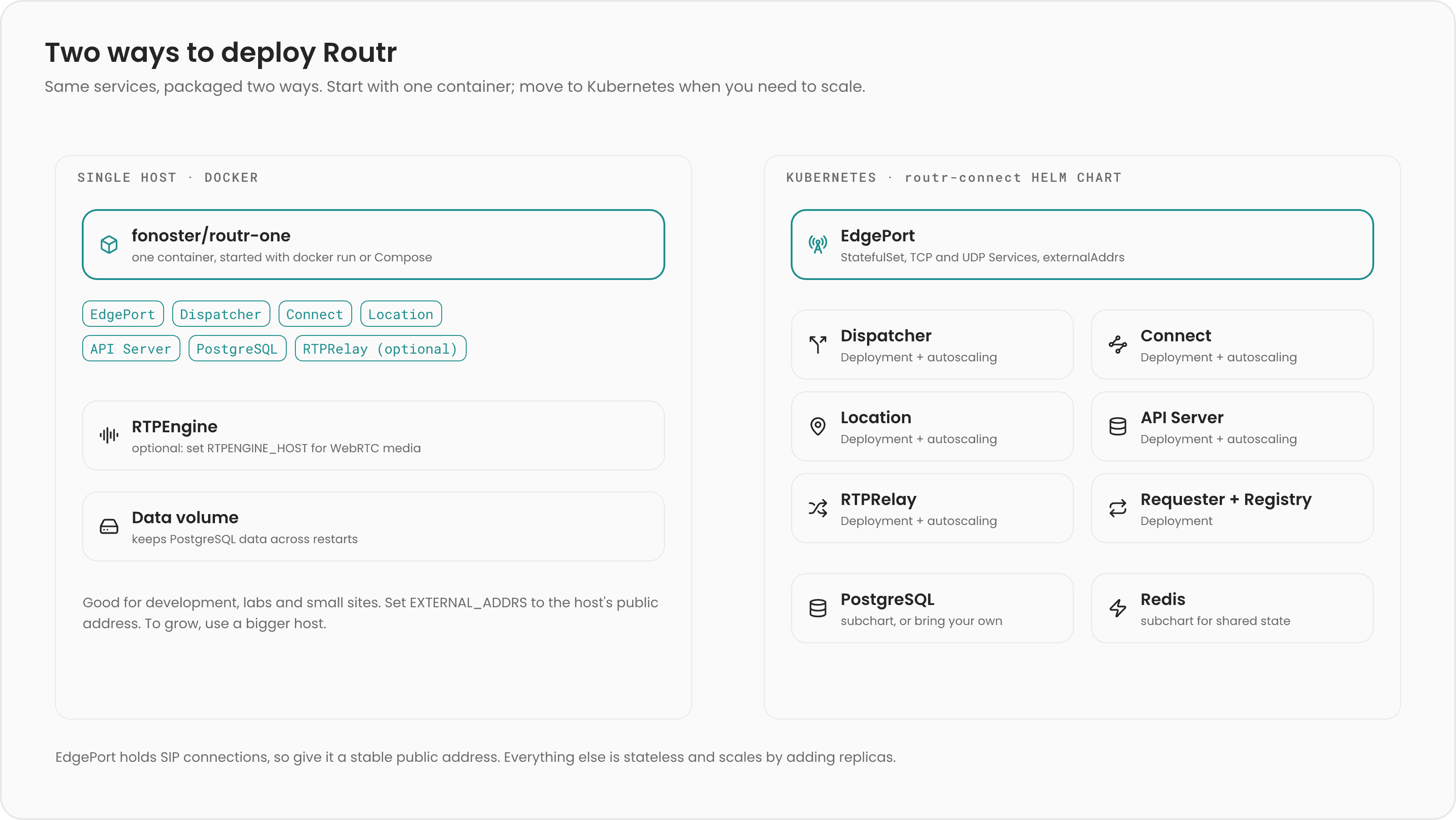
fonoster/routr-one image packs every service into one container for a single host. The routr-connect Helm chart runs each service as its own workload on Kubernetes, so you can scale them independently. Both run the same services in Connect mode.
routr-one on Docker
fonoster/routr-one starts the EdgePort, Message Dispatcher, Connect processor, Location Service, and the PostgreSQL-backed API Server in one container. By default it also starts an internal PostgreSQL database. If you set RTPENGINE_HOST, it adds the RTPRelay middleware to drive your RTPEngine.
Use it for development, demos, and small single-host deployments such as a home or office phone system. It’s the fastest way to get Routr running, as the Quickstart shows.
Its limits follow from running in one process tree:
- Registrations live in memory, in the built-in Location Service. A restart clears them, and phones must re-register.
- Nothing scales independently. To handle more traffic, you need a bigger host, not more replicas.
- One container is one EdgePort, so a restart drops the calls in progress.
START_INTERNAL_DB=false and point DATABASE_URL at your PostgreSQL server. See Deploy with Docker and Environment variables.
routr-connect on Kubernetes
Theroutr/routr-connect Helm chart deploys each service separately:
The chart also installs its dependencies as subcharts:
- PostgreSQL (
postgresql.enabled, on by default) for the API Server. To use an existing database, disable the subchart and setapiserver.databaseUrl. - Redis (
redis.enabled, on by default) for the Location Service and Registry caches. Several Location replicas need Redis to share registrations and session counts.
Which component scales how
- Scale stateless services freely. The Dispatcher, Connect, Location (with Redis), API Server, and Requester hold no per-call state, so any replica can handle any message.
- Scale EdgePorts deliberately. EdgePorts hold transactions and client connections. Adding one is cheap, but removing or restarting one drops its calls and forces its clients to re-register. Several EdgePorts cooperate to reach endpoints connected to each other. When you run more than one, set
TRUSTED_EDGEPORT_ADDRESSESon the Connect processor so it honors forwards between them. - Scale media separately. Routr doesn’t carry media unless you add RTPEngine. Media servers behind Routr scale as Peers.
Exposing EdgePorts to SIP clients
SIP puts addresses inside its messages, so an EdgePort must know the public address clients use to reach it, and that address must stay stable:- Set
externalAddrs. In the chart,edgeport.externalAddrsis required for EdgePort to work. With routr-one, set theEXTERNAL_ADDRSenvironment variable. Use an address your clients can reach, such as a static public IP or a load balancer IP that doesn’t change. - Set
localnetswhen needed. EdgePort uses the local networks to decide whether to advertise its internal or external address. By default it uses the networks the operating system reports. Setedgeport.localnetsto override them. - Choose a service type. The chart creates separate Services for UDP and for TCP-based transports (TCP, TLS, WS, WSS). Both default to
NodePort. Setedgeport.serviceTypeUDPandedgeport.serviceTypeTCPtoLoadBalancerto get an external IP from your cloud, and useserviceAnnotationsUDPandserviceAnnotationsTCPfor provider-specific options. - Mind the traffic policy.
externalTrafficPolicyUDPandexternalTrafficPolicyTCPdefault toCluster. WithLocal, Kubernetes keeps traffic on the node that received it and preserves the client’s source address, which matters for ACLs and NAT handling, but only nodes running an EdgePort pod receive traffic.
Kubernetes load balancers aren’t SIP-aware. They forward packets, not SIP transactions. Prefer connection-oriented transports so each client stays on the EdgePort it connected to, and let EdgePort cooperation handle calls between EdgePorts.
edgeport.transport.
Choosing a topology
Related pages
Deploy with Docker
Run routr-one for a longer-lived setup.
Deploy on Kubernetes
Install and configure the Helm chart.
Scale with Redis
Share registrations across Location replicas.
EdgePort cooperation
Learn how EdgePorts reach each other’s endpoints.