

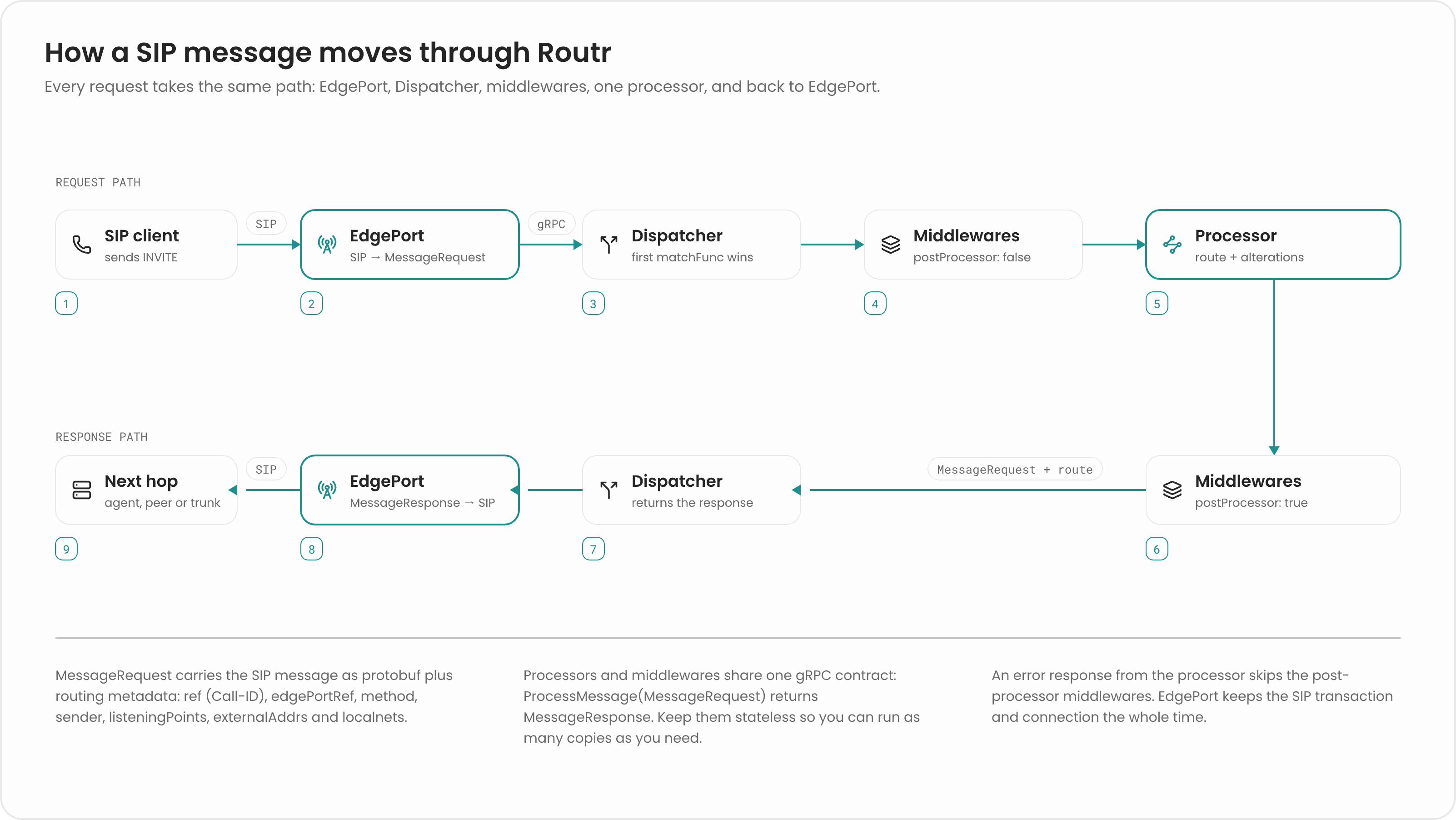
1. The EdgePort converts SIP to protobuf
When a request arrives, the EdgePort creates a server transaction for it and converts the SIP message into aSIPMessage protobuf. It wraps that in a MessageRequest, which adds the metadata downstream services need to route the message without keeping any state of their own:
edge_port_refidentifies the EdgePort that received the message. The Location Service stores it with each registration, which is what lets EdgePorts cooperate.listening_points,external_addrs, andlocalnetsdescribe the EdgePort’s interfaces, so a Processor can work out which address to put inViaandRecord-Routeheaders.messageholds the parsed SIP headers (From,To,Contact,Via,Route, and others), any extra headers as a list of extensions, and the body.
ProcessMessage on its configured processor address, usually the Message Dispatcher. Every Processor and Middleware implements this same gRPC method:
2. The Dispatcher picks a Processor
The Message Dispatcher holds an ordered list of Processors. For each message, it walks the list and selects the first Processor that meets both conditions:- The message’s method is in the Processor’s
methodslist. - The Processor’s
matchFuncreturnstruefor the message.
matchFunc is a JavaScript function that receives the JSON form of the MessageRequest. For example, this configuration sends MESSAGE requests to an instant-messaging Processor and everything else to Connect:
req => true placed first would take every message. Put specific Processors first and the catch-all last.
If no Processor matches, or the matched Processor is unreachable, the Dispatcher returns a gRPC error instead of a processed message, and the request isn’t forwarded.
3. Middlewares run before and after the Processor
Middlewares are listed in the Dispatcher configuration in the order they run. Each has apostProcessor flag:
- Pre-processor Middlewares (
postProcessor: false) see the request before the Processor. Use them to authenticate, normalize, or log requests. SimpleAuth is a pre-processor Middleware. - Post-processor Middlewares (
postProcessor: true) see the request after the Processor has altered it. Use them when you need the final route or headers. RTPRelay is a post-processor Middleware, because it rewrites the SDP of the request that’s about to leave.
401 Unauthorized challenge, the remaining Middlewares in that phase are skipped.
Error responses coming back from the far end (anything other than a success or 180 Ringing) skip the Middlewares and go straight to the Processor.
4. The Processor returns a response or an altered request
The Processor does the actual work. It can answer the request itself, for example with200 OK for a valid REGISTER, 401 Unauthorized to challenge a caller, or 404 Not Found when there’s no route.
Or it can let the request through. In that case it computes a route, usually by asking the Location Service, and applies alterations to the request: it decreases Max-Forwards, rewrites the Request-URI to the target, adds its own Via and Record-Route headers, adds a Route to the next hop, and adds or removes extra headers. The Alterations API provides these as small functions you compose. The Processor returns the altered MessageRequest to the Dispatcher.
5. The EdgePort sends the SIP message
The Dispatcher returns the result to the EdgePort, which acts on it:- If the result is a response, the EdgePort sends it back to the caller on the original server transaction.
- If the result is a request, the EdgePort applies the new Request-URI and headers and forwards the request to its next hop in a new client transaction.
The response path
Responses travel through the same pipeline. When the callee answers with180 Ringing or 200 OK, the EdgePort converts the response to a MessageRequest and sends it to the Dispatcher. The Connect processor, for example, removes its own Via header and returns the response. The EdgePort then relays it on the server transaction it kept for the original request.
That kept transaction is why the EdgePort is stateful: only the EdgePort that received a request can send its responses back to the caller.
Related pages
Architecture
See every component and its role.
Build a processor
Write your own routing logic.
Build a middleware
Add behavior before or after the Processor.
Alterations API
Look up the functions that change a request.