

Why the request must reach the right EdgePort
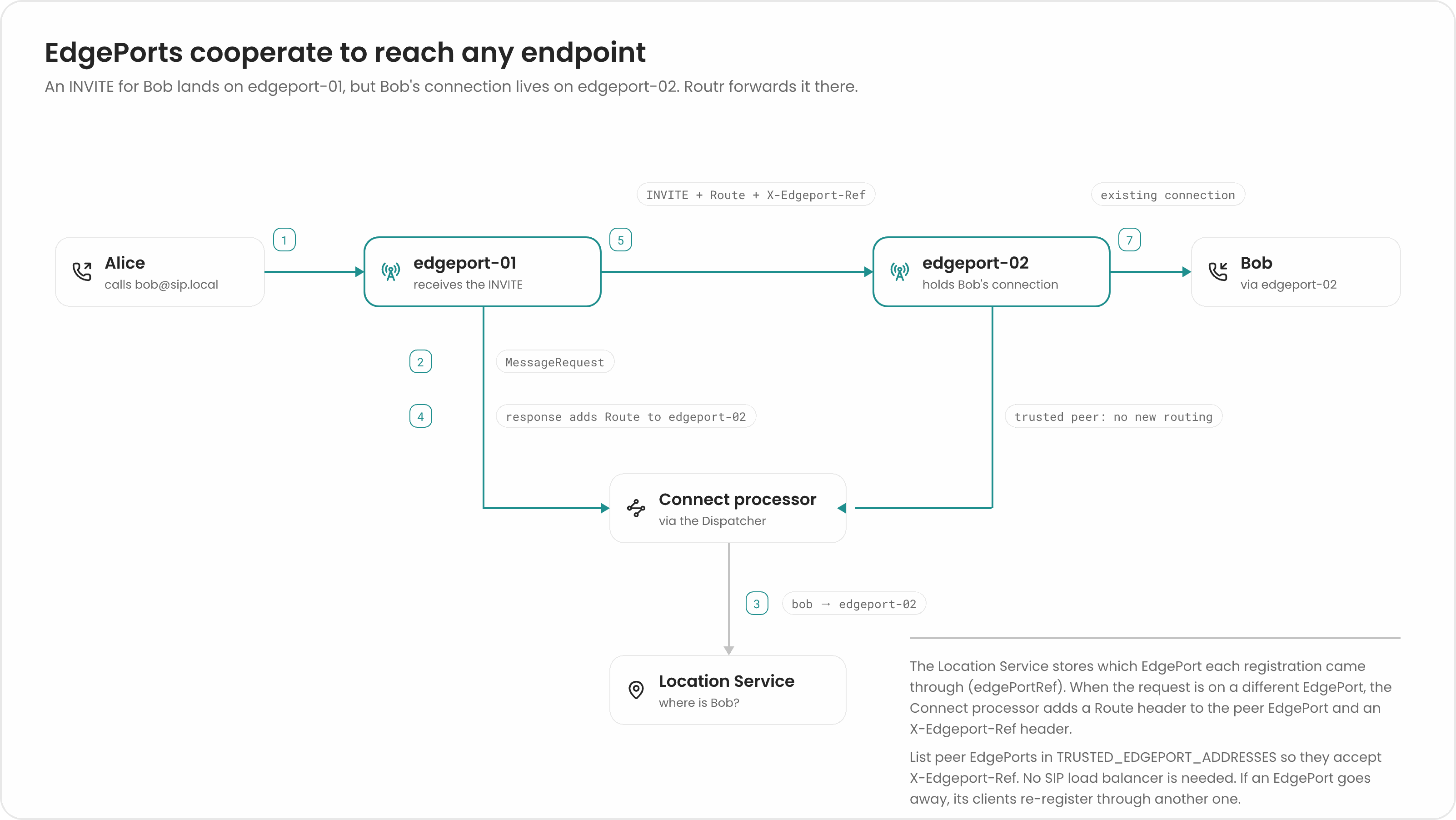
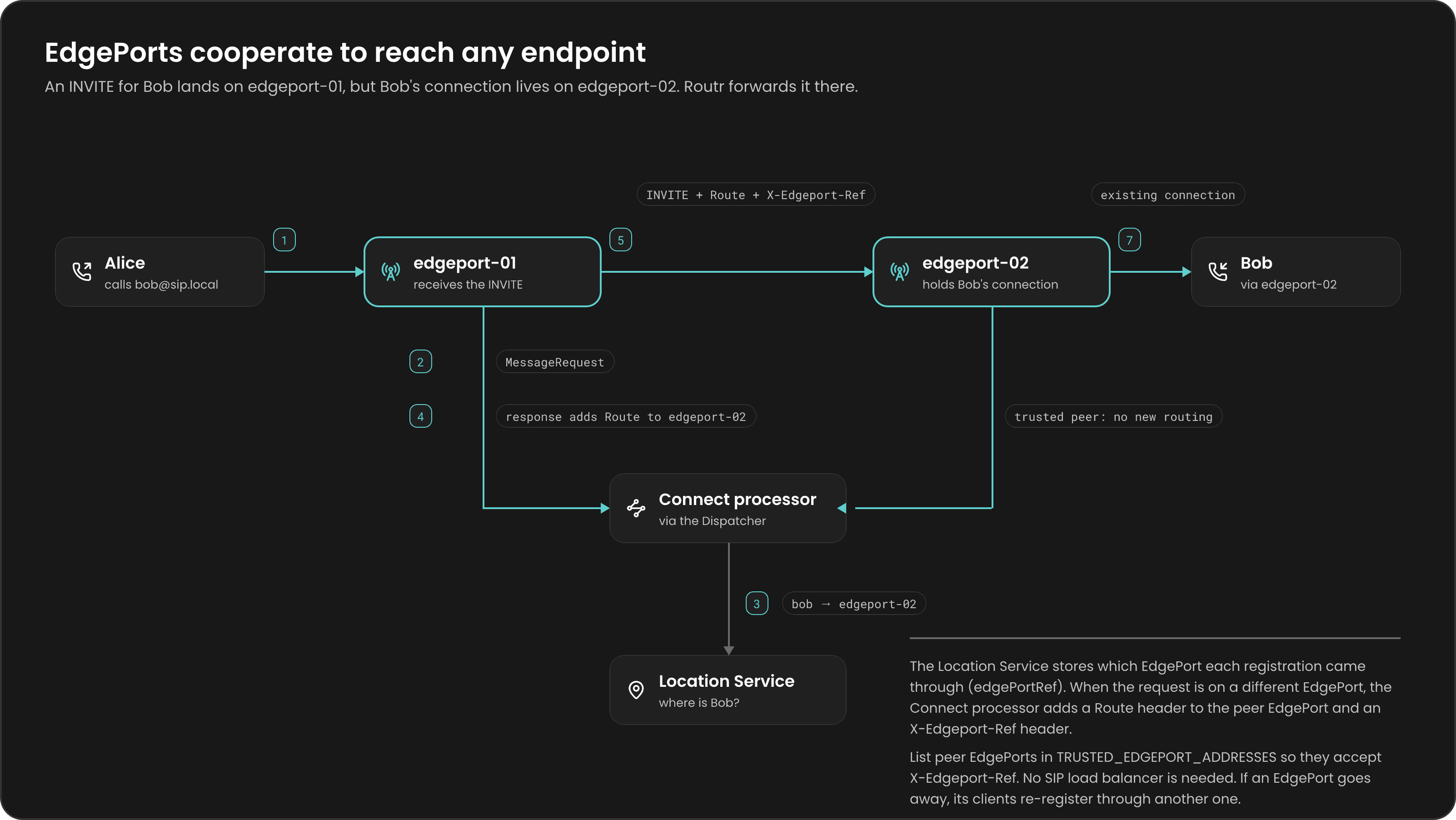
A phone behind NAT can usually be reached only through the connection, or NAT mapping, it opened itself. If Bob registered throughedgeport-02 over TCP, only edgeport-02 holds that connection. A request for Bob that lands on edgeport-01 can’t simply be sent to Bob’s address: there’s no connection there, and his NAT router would drop it.
How EdgePorts cooperate
- Registration records the EdgePort. When Bob registers, the Location Service stores his route together with the
edgePortRefof the EdgePort that received theREGISTER, plus that EdgePort’s listening points, external addresses, and local networks. An EdgePort’s ref comes from therefin its configuration, or from theHOSTNAMEenvironment variable when it’s set. On Kubernetes, that’s the pod name. - Connect compares refs. Alice’s
INVITElands onedgeport-01. The Connect processor looks up Bob, gets his route, and sees that the route’sedgePortRefisedgeport-02, not the EdgePort the request came from. - Connect sends the request to the peer EdgePort. Instead of routing straight to Bob, Connect adds its own
ViaandRecord-Route, then aRouteheader pointing atedgeport-02, followed by aRouteto Bob. It also adds anX-Edgeport-Refheader and decreasesMax-Forwards. - The peer EdgePort delivers it.
edgeport-01sends the request toedgeport-02. There, Connect seesX-Edgeport-Ref, confirms the request comes from a trusted peer EdgePort, rebuilds the route from the message without running routing again, andedgeport-02delivers theINVITEto Bob over his existing connection.
Record-Route headers, later requests in the same dialog, such as ACK and BYE, follow the same EdgePorts.
Trusting peer EdgePorts
A request withX-Edgeport-Ref skips routing and access checks on the second EdgePort. Anyone can put that header in a SIP message, so honoring it from any source would let an attacker relay calls through Routr for free (toll fraud).
The Connect processor honors X-Edgeport-Ref only from addresses you list. Set these environment variables on the Connect processor:
When a request carries
X-Edgeport-Ref but doesn’t come from a trusted address, Connect removes the header, logs a warning, and routes the request normally with the usual access checks. X-Edgeport-Ref is also on the default list of platform headers Connect removes from untrusted sources (see SIP headers).
Use connection-oriented transports
EdgePort cooperation relies on the callee’s connection or NAT mapping staying open. Use TCP, TLS, WS, or WSS for your clients whenever you can. UDP has no connection. A NAT router keeps a mapping (a pinhole) open for UDP only while traffic flows, and many routers close it after about 30 seconds of silence. After that, Routr can’t reach the phone until it sends something again. If you must use UDP, set the clients’REGISTER expiry, or re-register interval, below 30 seconds so the pinhole stays open.
When an EdgePort restarts
The EdgePort is the only stateful service in Routr. It keeps SIP transactions and client connections in memory, and they don’t survive a restart:- Calls in progress on that EdgePort are lost. Requests and responses for those calls have no transaction or connection to go back to. Routr doesn’t move calls to another EdgePort.
- Its registrations become unreachable. The Location Service may still hold routes that point at the restarted EdgePort, but the connections behind them are gone. Each client must reconnect and re-register, through the restarted EdgePort or another one, before it can receive calls again. How fast that happens depends on the client’s re-register interval and how quickly it notices the lost connection.
Related pages
EdgePort reference
See the EdgePort configuration, including
externalAddrs and localnets.Environment variables
Look up every variable, including the trust settings.
Deployment topologies
Learn how to run several EdgePorts.
Message flow
Follow one request through Routr.